Using Sections
Last updated: September 2, 2026
Sections and Rows are the places where you input all of your beautiful content in which you want your audience to see.
Using Sections:
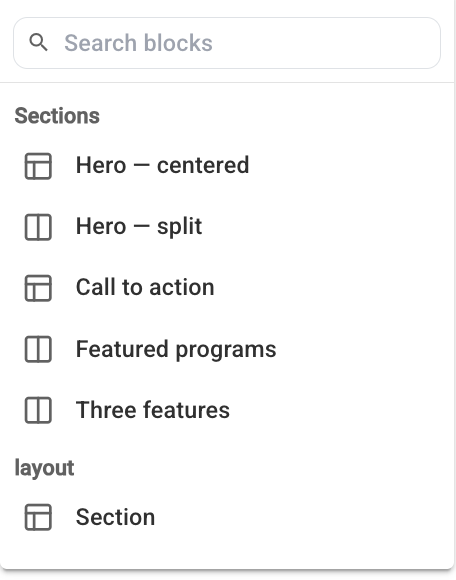
To add your first section, simply click the Add Section button on the left rail

You now have a variety of sections to choose from, for now we will add the Section under Layout
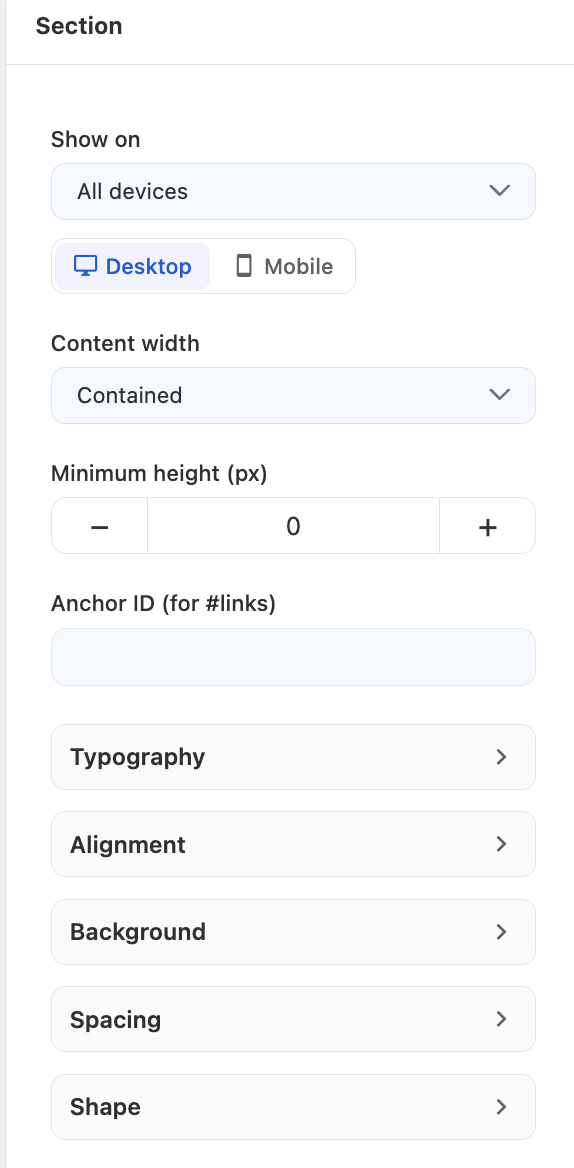
You now have the option to fully customize how the section looks and feels
Content Width: adjusts how far the section spans across the screen
Minimum Height: How tall you want the section to be
Typography: Font type and size
Alignment: Where the section aligns on the screen
Background: Choose from a variety of background options including image and video
Background layers: Stack video frames, images, shading over your section
Spacing: Adjust padding and margin of your section
Shape: Add a unique divider for additional design to your section
Adding Blocks of content in your section
Click the Add Block button tabbed underneath section
You have a variety of different 📄 Blocksto add onto your site
What's Next?